Activate and Deactivate Scrub IDs
There are three tables which contain information about and settings for scrub IDs. Those tables are:
- ScrubTable
- ScrubParameters
- ScrubDef
The ScrubTable is a combination of the ScrubDef and ScrubParameters tables. Fusion gurus only have access to the ScrubParameters table. Rhodes makes all changes to the ScrubDef table.
If either the ScrubDef or ScrubParameters tables are updated, those changes are automatically updated in the ScrubTable.
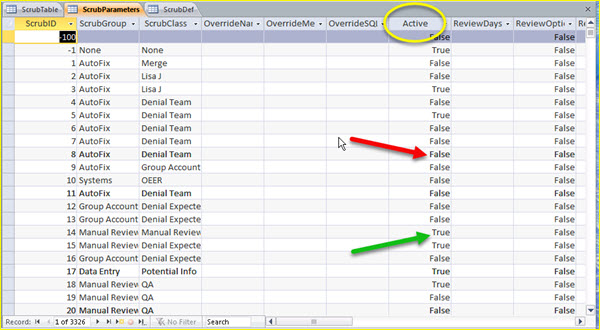
Activating and deactivating a specific scrub, a specific scrub ID, is done by changing an Active value to True, to activate, or False, to deactivate.
Using Access, navigate to the ScrubParameters table, scroll through the scrub ID records and change the Active field to True or False to activate or deactivate each scrub ID.
|