Payers Field Set
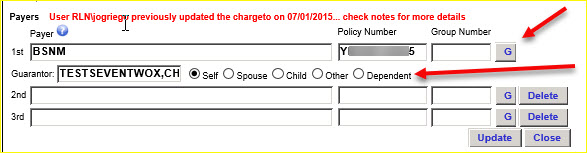
The payers set of fields includes: Payer, Policy Number and Group Number for one, two or three payers. The area also includes Guarantor fields: name, and the radio button group: Self, Spouse, Child, Other, Dependents. The lines 2nd and 3rd are for additional Payer and Guarantor information.
Change payer and guarantor information as needed.
Click on the blue question mark  icon next to ‘Payers’ to download the PayerSearchDocumentation.pdf with information about searching on Payer. See the Payer Search Instructions information in the Appendix.
Guarantor Information: In the Payers area, click on the G button to add or change Guarantor information as needed for each Payer. The G button is a toggle to display and hide the Guarantor information for the Payer.
|
If you changed data in the Patient, Responsible Party or Payers area, click on the Update and Close buttons as needed to manage that information.
Click on Update to save the changes you made.
Click on Close to contract, or reduce, the Demographics section. Any changes you made are not saved if you did not first click the Update button.